Yeh guide kis kaam mein madad karti hai
Samjhein order mein kaunsi changes abhi allowed hain, cancellation jaan kar confirm karein aur duplicate banane ke bajaye private status link par correction karein.
Shuru karne se pehle
Customer ko private status link aur staff ko order-management access chahiye. Actions method/current state par depend hain; completed/cancelled terminal order fresh editable cart nahin.
Yeh kahan milega
Customer status page ke offered Cancel/request-change/correction controls use karta hai. Staff Partner → Orders → detail ke allowed rejection/status actions use karta hai.
Qadam ba qadam
-
Existing order khol kar change se pehle current status parhein.
-
Cancel order offered ho to tap aur separate confirmation parhein. Cancel nahin karna to Keep order, warna jaan kar confirm karein.
-
Customer ke taur par confirm ke baad success aur nayi state dekhein. Button nazar aana pehle se cancellation nahin.
-
Direct cancel allowed nahin to offered request-change/cancellation ya store contact use karein.
-
Staff request dekh kar sirf method/state ke allowed next actions use kare. Rejection/correction ka required note dein. Partner Orders foran update hota hai aur changes device par save hoti hain, offline bhi. Pending changes sync ke baad server, customer page aur doosre devices tak pohanchti hain; server ki state badli ho to ruki hui change review karein. Sync controls ke liye Orders guide dekhein.
-
Needs update/correction par store ka note parhein, allowed edit/resubmit flow kholein aur identified information durust karein.
-
Resubmit se pehle items, required fields aur new total dekhein. Asal resubmission current catalog/pricing use kar sakti hai; correction request akeli old snapshot nahin badalti.
-
Correction ek dafa submit karke intezar karein. Wahi private link par resulting state verify karein.
-
Asal money return store ke payment process se handle karein. Cancelled status bank refund khud transfer nahin karta.
Choices ko samjhein
-
Direct cancellation state/method par hai. Preparation/terminal state ke baad controls na hona expected ho sakta hai.
-
Change request request hai, submitted snapshot ka foran edit nahin.
-
Confirmation accidental tap bachati hai; Keep order existing order rakhta hai.
-
Staff status moves past price fixed rakhte hain. Customer resubmission alag event hai jo price recalculate kar sakta hai.
Nateeja check karein
Existing link confirmed cancellation ya accepted corrected order dikhata hai. Sirf check/change request se extra order nahin bana.
Agar masla ho
-
Cancel control missing: method/status dekhein; access error ka andaza ya dobara order submit na karein.
-
Correction total badla: current catalog/options aur displayed total resubmit se pehle compare karein.
-
Customer ki confirmation par connection drop ho: retry se pehle existing link ki state parhein. Staff wohi change dobara bhejne ke bajaye Partner mein order ki pending changes dekhein.
-
Already completed/cancelled: terminal state changes limit karti hai; genuine dispute mein store contact/support process use karein.
Screen ki misaalein
In screenshots mein example data hai. Aap ke naam, amounts aur controls alag ho sakte hain. Apni screen ki current values ko follow karein.
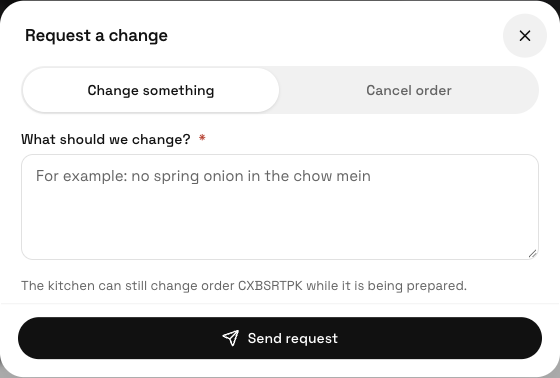
Request a change mein change aur cancellation alag hain; bhejne wali action parhein.