What this guide helps you do
Understand the automatic store address and choose an eligible custom Krobr address once.
Before you start
You must own the store and have a package that includes Custom web address. A custom Krobr address cannot be changed or undone after it is set.
Where to find it
Workspace → Experiences → store → Custom web address. On phones open Experiences from the bottom bar or More, then the store.
Clicking Web Address or Visit live page opens the actual store address in a new tab. An ACTIVE connected custom domain is used when available. Copy address copies that same public destination; the Visual editor stays on the store’s Krobr address.
Step by step
-
Read the current address shown on the store page. An automatic address already works after publishing.
-
If New Custom Web Address is available, enter only the name before .krobr.com, without https:// or a full domain.
-
Check spelling and the availability message. Use lowercase letters, numbers and permitted hyphens; follow the validation shown.
-
Read the permanent-change confirmation before submitting. Share the resulting address only after the save succeeds.
-
Open the store through both the original and chosen addresses. The app uses the address allowed by your current package.
Understand the choices
-
The automatically assigned address is permanently reserved. A chosen custom name is also reserved and cannot be reused for a different store.
-
A downgrade can make the automatic address primary again; your chosen name remains reserved for a later eligible upgrade.
-
A custom Krobr address differs from a purchased domain such as example.com. You pay your registrar for the domain; self-service connection through Custom domain is free on eligible packages. Optional setup help has a one-time fee.
Check the result
The store page shows the saved address. Existing original links still resolve, with the app selecting the appropriate primary address.
If something goes wrong
A private management or editor link can require a different account. The recovery message shows your signed-in email and offers Switch account for the same page or Go to my stores. Choose the correct account.
-
Locked card: check the package entitlement. A legacy store without a separate automatic address may not support this one-time action.
-
Name unavailable: choose another; reserved, previously used or protected names cannot be claimed.
-
No edit control after saving: this is expected because the choice is permanent.
Screenshots
These screenshots use demonstration data. Your names, amounts and available controls may differ. Current values on your own screen take priority.
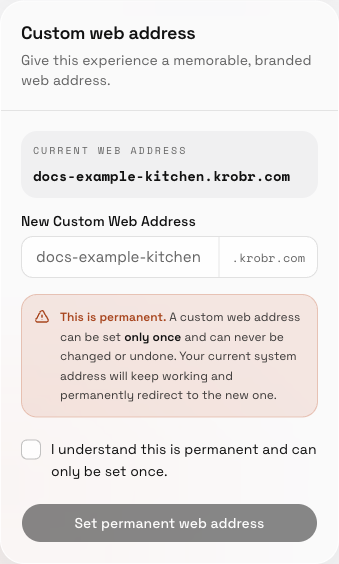
Read the permanent-address warning and confirmation before setting the custom Krobr address.